Analytics Agent Configuration
Overview
This section provides a guide to the various configuration options available for the analytics agent running within protected applications.
The configuration is configured/stored in SaaS and applied during protection of the application, injected by the protection technology (defender). This also applies if the protection occurs on-prem, as long as monitoring is enabled.
Currently, the configuration allows for the following fine-tuning:
| Configuration | Description |
|---|---|
| Custom Responses | Ability to tune the custom responses |
The UI the ability to configure the custom responses for the application. In addition, the configuration is defined using a simple JSON document and can be uploaded to SaaS using the REST APIs. See Enabling Analytics Agent Configuration below.
Custom Responses
Custom responses provide the ability to configure the exact behaviour expected by the protected application for when it detects a threat at runtime. This provides an option for developers to customize the runtime behaviour of the application based on the threats experienced.
When used, the analytics agent is configured to invoke one or more custom response depending on the threat found at runtime.
The responses are invoked synchronously and sequentially, which means that all actions defined are invoked in the order they are defined, one at a time.
Available Responses
Depending on the version of the APK/iOS defender being used to protect the application, there may be slight differences in supported options for the custom responses.
Please refer to the "Version Selection" section below to find the correct version of the configuration used in your setup.
Enabling Analytics Agent Configuration
The configuration is defined using a simple JSON document, which is then uploaded to XTD SaaS using the APS REST APIs.
The configuration can be set for a specific application or build. If the configuration is set on an application, it applies to all future builds of that application. If set only on a build, it will be applied to that specific protection job.
See App Protection for more details
On-prem Protection
For using analytics agent configuration for on-prem protections, the configuration shall still be set on the application object in SaaS using the same method as described above. During on-prem protection, the tools will pull down the analytics agent configuration and apply it as part of the protection.
Version Selection
The highest, current version of the analytics agent configuration is currently ->v1.2.0
Please refer to the list below for other versions.
APK Defender
| APK Defender Version | Analytics Agent Configuration Schema |
|---|---|
| 5.2.0 | ->v1.0.0 |
| 5.1.0 | ->v1.0.0 |
| 4.15 | ->v1.0.0 |
| 4.14.1 | ->v1.0.0 |
| 4.14 | ->v1.0.0 |
| 4.13.1 | ->v1.0.0 |
| 4.12 | ->v1.0.0 |
iOS Defender
| iOS Defender Version | Analytics Agent Configuration Schema |
|---|---|
| 8.2 | ->v1.0.0 |
| 7.13 | ->v1.0.0 |
Finding your Version
When using SaaS, the defender version used will be displayed after protection of your application, at the bottom of the build results page. Use this as a reference for above to find the correct configuration version.
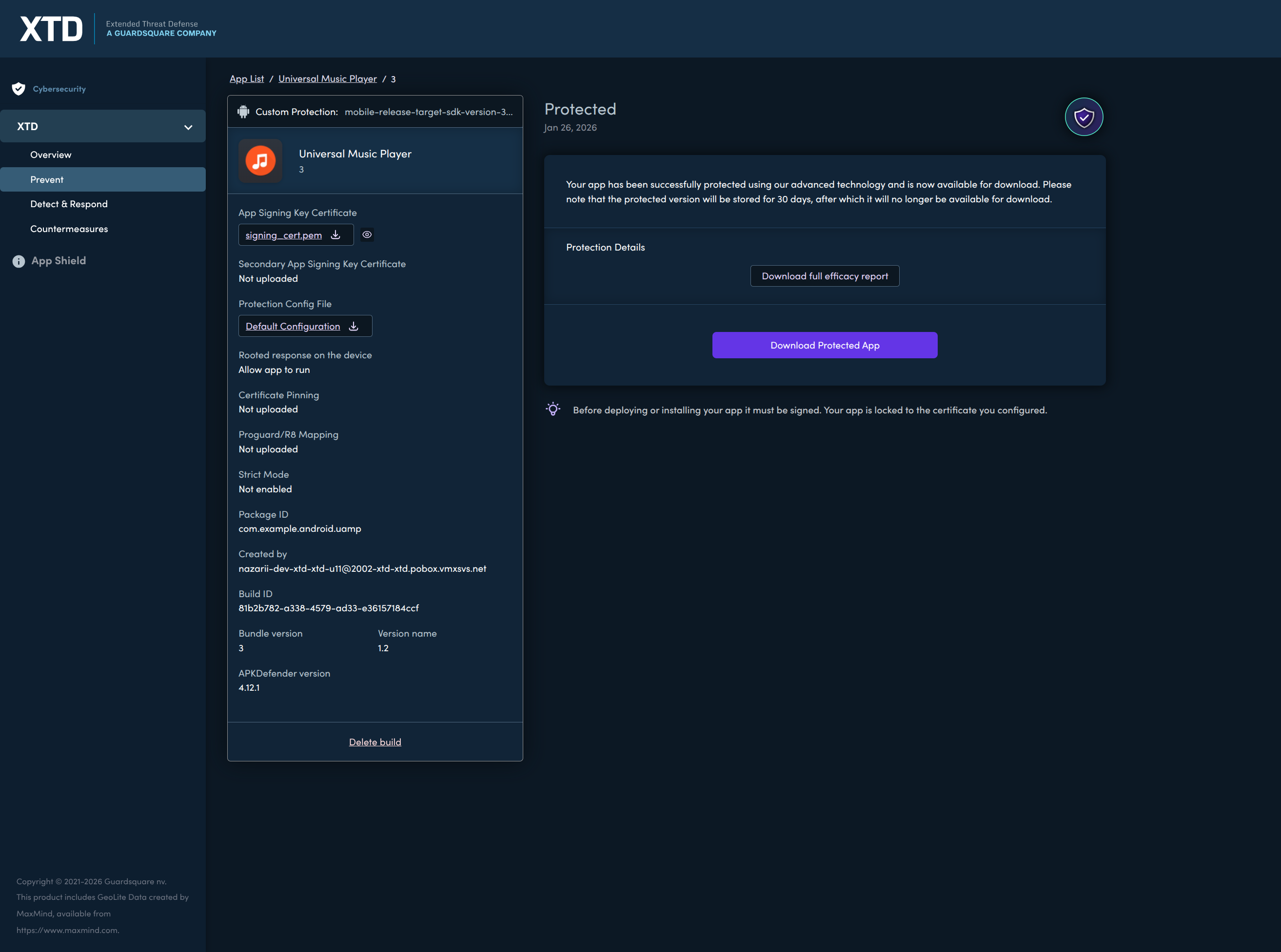
When using on-prem tools, the version should be indicated by your binary
bash$ apkdefender -v
apkdefender: version x.y.z revision <x> built on Jan 1 1970
Supported Configurations Per Product and Platform
Below is a summary of the detections supported on Android and iOS. It also indicates which detections support custom responses and which provide XTD SDK callback support.
Please note that AARs and APKs cannot both be protected by XTD at the same time.
If an AAR requires protection, XTD protection must instead be applied to the final APK. The same principle applies to iOS apps and their corresponding XCframeworks.
Similarly, custom responses cannot be implemented simultaneously in both an AAR and APK, or in their iOS equivalents. The same restriction applies to XTD SDK integrations.
| Detection Type | Product Type | Response Support | ||||
|---|---|---|---|---|---|---|
| Android APK/AAB | Android AAR | iOS xcarchive** | iOS xcframeworks** | Custom response | XTD SDK callback support**** | |
| Bootloader Unlock | y | y | N/A | N/A | y | y (Android only) |
| Attestation Failure | y | y | N/A | N/A | y | y (Android only) |
| Debugger | y | y | y | y | y | y |
| Emulator | y | y | y | y | y | y |
| Overlay | y | n | N/A | N/A | y | y (Android only) |
| Rooting/Jailbreak | y | y | y | y | y | y |
| Side Loading | y | y | N/A | N/A | y | y (Android only) |
| Tampering | y | n* | y | y | y | y |
| Hooking | y | y | y | y | y | y |
| Domain Whitelist Violation | y | n | N/A | N/A | y | y (Android only) |
| Installer Mismatch***** | y | y | N/A | N/A | y | y (Android only) |
| MITM | y | y | y | n | y | y |
| VPN | y | y | y | n | y | y |
| Proxy | y | y | y | n | y | y |
| DNS Inconsistency | y | y | y | n | y | y |
| Accessibility Malware*** | y | y | N/A | N/A | n | n |
* The security library itself, including the translated methods it contains, is protected against modification. However, all other bytecode and resources are considered unrestricted and can theoretically be modified.
**iOS dylibs are not protected as part of the protection process when referenced in an xcarchive or an xcframework.
***The detection column is already available in the dashboard. The population of detection data is planned to begin in June 2026. The service is based on server side detection and may require updates to your application. See enabling accessibility service.
****On iOS, XTD SDK does not support Dynamic XCFrameworks
*****Installer Mismatch detection is not available in the XTD dashboard